How to map machine states by translating schematics and requirements into PLC code
Key Highlights
- Breaking down complex industrial automation systems into clear inputs, outputs and machine states significantly simplifies both troubleshooting and program development.
- Understanding how to map electrical schematics alongside hydraulic and pneumatic requirements allows engineers to seamlessly translate drawings into operational ladder logic.
- Incorporating structured machine states, positional feedback from sensors, and safety conditions like fault states and emergency stops ensures reliable and efficient automated workflows.
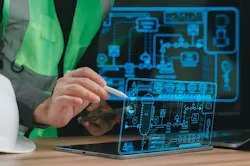
Control systems are built with hydraulics, pneumatics and electrical components. Programmable logic controllers (PLCs) are used to signal mechanical devices and to monitor feedback. A human-machine interface (HMI) gives an operator a viewpoint of the components and creates an interface. Troubleshooting control systems involves having system knowledge in all these applications and components or specializing in hardware, electronics, mechanical or software. Otherwise, a good systems approach will allow an engineer or a non-degreed technician or technologist to troubleshoot any of these components.
On top of all these fields is process—the overall application that the system is trying to accomplish; thus, the title, process engineer. If you’re a process controls engineer, then you are an engineer that makes control applications for the process to run. Application engineers are those control engineers who talk to figure out the best components to use for an outcome. Programmers are the folks that program the PLC. Many people only do software or hardware, but true system folks can do both. Motion should also be mentioned because motion and drives are a specialty in controls.
All these functions can make a control system hard to deconstruct. Sometimes it’s best just to break a system down into inputs and outputs and then look at how that applies to the system functionality and end goals of the process. For instance, what if your customer wanted an automated station that pushes material with a hydraulic actuator and then clears scrap into a box? Or what if the system is already there, but the customer wants it to be automated by a PLC? How do you contrive logic from a wired diagram?
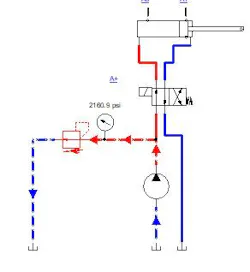
An example created with Famic Technologies’ Automation Studio uses hydraulics and pneumatics to move an object and then push an object off a conveyor.
If a controls person writes down the inputs and outputs and looks at some of the machine states based on the given equipment, then a base can be formed for wiring or programming. The following states could be conceived from the inputs and expected outputs. The example in Figure 1 shows a hydraulic actuator and a pneumatic actuator with an electrical schematic. Table 1 shows the inputs and outputs and states.
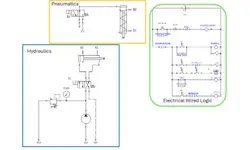
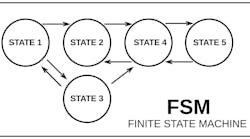
If one can discern that the overall system has inputs, outputs and does some work in between the inputs and outputs, then one can visualize what should be programmed from wire diagrams to reach a specific outcome. Picture somewhere on a machine that there is a pneumatic actuator and a hydraulic actuator and then a panel where the inputs are wired as they are in the schematic. When simulation is started, the machine is in an idle state and is waiting for a command (Figure 2).
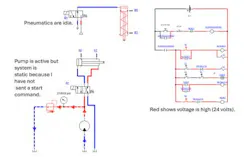
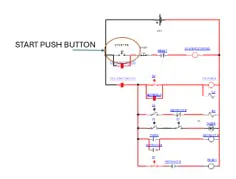
At this point, the simulation would allow toggling the start push button (Figure 3). The start push button being actuated sends a signal to the coil and seals in the start. When that occurs, the solenoid on the hydraulic actuator gets a signal and moves the hydraulic actuator out (Figure 4).
Get your subscription to Control Design’s daily newsletter.
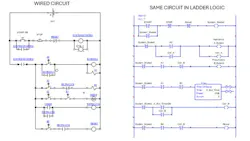
Once the hydraulic actuator reaches the extended proximity switch, the A1 proximity switch is made and, if the pneumatic cylinder has not been extended to proximity switch B1, then it will extend. Once the hydraulic and pneumatic actuators are extended, there is a 2-second timer, and it will start counting. At 2 seconds, the “RETRACT B” command will execute. Once cycle requires both the hydraulic actuator and the pneumatic actuator to extend and retract. So far, we have a schematic and hydraulic and pneumatic system with actuators that have inputs to give feedback for the position of the actuator. Putting the wired circuit and the ladder logic side-by-side demonstrates how it’s possible to code from drawings, but also the similarities between a wired circuit and software (Figure 5).
If an engineer or technician can take written requirements and drawings and turn them into code or if you have the ability to sit and watch and machine and map out a table, then it’s not hard to deconstruct a system and figure out how the machine works or what interfaces are needed to automate further or to troubleshoot. For instance, there is nothing in this scenario that examines if the actuators do not make a proximity switch. One can look at the logic though and figure out that additional states could be added for a fault state, as well as adding an emergency stop.
The simulation is also clunky based on the cycle. For instance, there would be a proximity switch indicating when material was present, as well, before moving actuators in a more realistic system. Understanding logic or being able to put machine states in order is a worthy troubleshooting process. Deconstructing states and understanding the smaller pieces that make up a complicated system make for easier troubleshooting. The simplest way is to look at inputs and outputs and write out states to get the process outcomes needed.
About the Author
 Tobey Strauch
Tobey Strauch
Arconic Davenport
Tobey Strauch is currently managing brownfield installations for controls upgrades at Arconic Davenport. She has previously worked as principal controls engineer and before getting her bachelor’s in electrical engineering, was a telecommunications network technician. She has 20 plus years in automation and controls. She has commissioned systems, programmed PLCs and robots, and SCADAs, as well as managed maintenance crews. She has a broad mix of mechatronics with process control. She enjoys solving problems with Matlab and Simscape. Contact her at [email protected].

 Leaders Logo
Leaders relevant to this article: