How many displays are enough? Balance centralized and local visualization
Key Highlights
- Learn how to strategically choose between centralized control rooms and distributed HMI access points based on the specific needs of their machine or process.
- Determine how to simplify the deployment and maintenance of HMI/SCADA systems using modern remote display technologies, industrial computing and networking options.
- See how physical screen attributes, placement and interface design choices directly impact operator usability and overall system effectiveness.
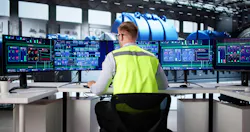
Centralized information for any given process or machine control is paramount to effective monitoring and control. How this gets accomplished has been a source of discussion among automation professionals for many years.
Should the information be displayed locally or remotely? How much does the operator need to know about the operations, and does the process/machine lend itself to having a single point of display? In many cases, multiple locations of data presentation have proven to aid the operators in efficiency and effectiveness in the monitoring of key data points.
We have all seen control rooms with multiple screens showing multiple facets of the operation on each screen. They are mounted above a desk typically and display real-time data to a host of operators. Power-generating stations come to mind.
This level of centralization serves this application very well since there isn’t a need for localization as such. Turbine monitoring can be done remotely and can be very effective. When alarm situations occur, the control room staff can relay the information to the maintenance department to affect change.
Consider an application that takes up a large footprint in a linear fashion. In that instance you may want to have multiple points of access using localized human-machine interface (HMI) display screens with pertinent data for the area of location. This creates some issues though. If for some reason you need to have access to data for the upstream portion of the process, you would need to physically change your location to get to that data.
This suggests that you have two different HMI application software applications running independently of each other. Supporting two different HMI applications may be detrimental to the efficiency of the process. Being able to have a single HMI application can provide easier maintainability.
Supervisory control and data acquisition (SCADA) or HMI display screens can support local or remote computational devices. HMIs typically run local software/firmware to display real-time information. It allows for data changes and possible edge-related activities by running multiple protocols such as MQTT.
Part of the conundrum of running computational devices on the plant floor is whether or not the HMI/computer needs to be industrially hardened. Running a commercially available desktop from Dell, for instance, is not recommended, but it can run software that acts like an HMI and/or a SCADA node.
Ethernet networks can support remote screen displays while the driving electronics are in a clean room with power filters and environmentally friendly statistics. Audio-visual over Internet protocol (AV over IP) and HDMI over Ethernet are two such technologies that allow for connecting a display remotely to a computer running SCADA/HMI software. This means that the endpoint display only needs to be hardened.
Get your subscription to Control Design’s daily newsletter.
Power over Ethernet (PoE) connectivity can also be used. Note that these technologies are point-to-point connections.
The amount of information that is required to be displayed will normally dictate the screen size. If the designer has a choice of size and aspect ratio, common opinion says, “The bigger the better.” Some control rooms I have seen have upwards of 60-inch displays that have been cut up into four separate active windows.
Having too much information on one screen can be overwhelming for a person to absorb, which comes down to design, which is outside the scope for this discussion. Having said that, the displayed information typically will expand to fit the available real estate. So rightsizing the display is important.
Where the display is mounted can have some effect on the sizing. With HMI software, the display will be a touchscreen, and the design needs to accommodate this technology. Having a 60-inch touchscreen can create a problem with unintended screen touching due to the movement around the screen.
If the display is panel-mounted, the door size and panel depth need to be considered regardless of screen technology. This is where a remote display may be useful due to the shallowness of the display as compared to a full-fledged HMI device.
Of course, an IPC can be used in a panel and mounted separately in the enclosure following recommended mounting considerations.
Screen size will depend on touch element sizing, number of active elements, distance from the operator for readability and available real estate. If the system has too much room, the display can become unusable.
Screen resolution used to be an issue but not anymore. High-resolution displays are commonplace, and, with the high-resolution screen display drivers, the ability to have a granularity commensurate with perfection is achievable.
In the display world, we have all the choices we need to create stunning graphics on any size screen implemented in a way that fits the application. These choices can sometimes make it difficult for the software developer to create functional displays.
Connecting specifications with software requirements will make the job much easier.
About the Author
 Jeremy Pollard
Jeremy Pollard
CET
Jeremy Pollard, CET, has been writing about technology and software issues for many years. Pollard has been involved in control system programming and training for more than 25 years.
 Leaders Logo
Leaders relevant to this article: